TCS Campus Interview l Campus Placements l Gauri Shrimali
Get link
Facebook
X
Pinterest
Email
Other Apps
Data Types in Java Programming
Get link
Facebook
X
Pinterest
Email
Other Apps
Data types in Java
Java is statically typed and also a strongly typed language because, in Java, each type of data (such as integer, character, hexadecimal, packed decimal, and so forth) is predefined as part of the programming language and all constants or variables defined for a given program must be described with one of the data types. Data Types in Java
Java has two categories of data:
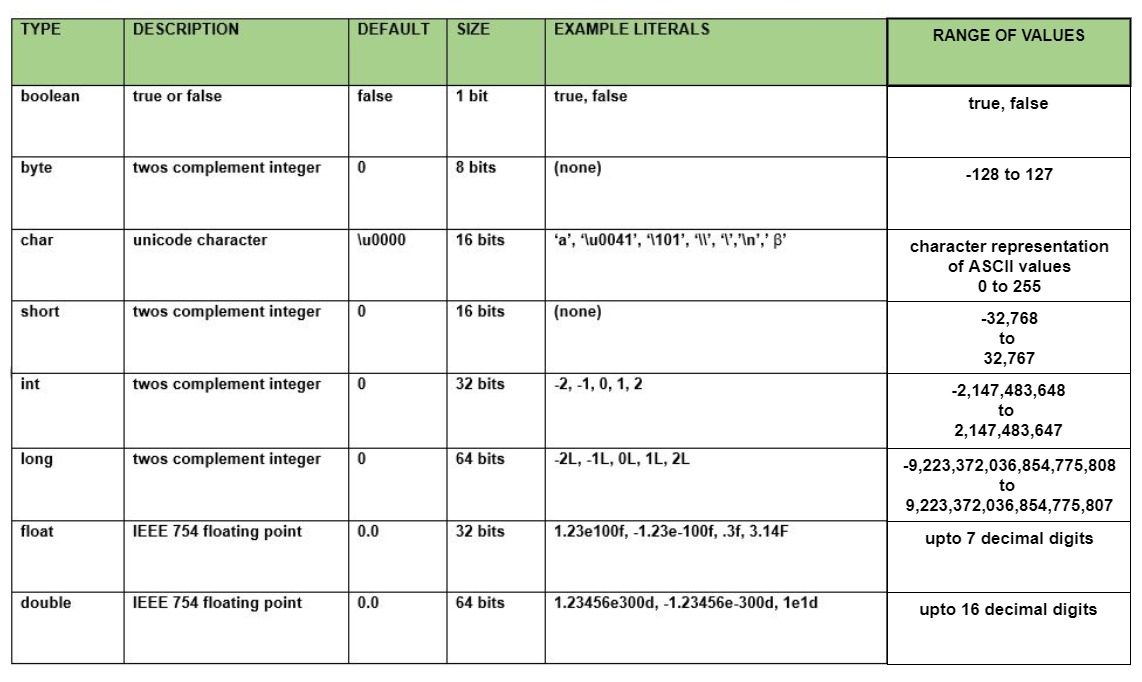
Primitive Data Type: such as boolean, char, int, short, byte, long, float, and double
Non-Primitive Data Type or Object Data type: such as String, Array, etc.
Primitive Data Type
Primitive data are only single values and have no special capabilities.
There are 8 primitive data types:
1. boolean: boolean data type represents only one bit of information either true or false, but the size of the boolean data type is virtual machine-dependent. Values of type boolean are not converted implicitly or explicitly (with casts) to any other type. But the programmer can easily write conversion code.
Syntax:
boolean booleanVar;
Size: virtual machine dependent
Values: true, false
Default Value: false
example
booleanb = true;
2. byte: The byte data type is an 8-bit signed two’s complement integer. The byte data type is useful for saving memory in large arrays.
Syntax: byte byteVar;
Size: 1 byte ( 8 bits )
Values: -128 to 127
Default Value: 0
3. short: The short data type is a 16-bit signed two’s complement integer. Similar to byte, use a short to save memory in large arrays, in situations where the memory savings actually matters.
Syntax: short shortVar;
Size: 2 byte ( 16 bits )
Values: -32, 768 to 32, 767 (inclusive)
Default Value: 0
4. int: It is a 32-bit signed two’s complement integer.
Note: In Java SE 8 and later, we can use the int data type to represent an unsigned 32-bit integer, which has value in the range [0, 232-1]. Use the Integer class to use int data type as an unsigned integer.
5. long: The long data type is a 64-bit two’s complement integer.
Note: In Java SE 8 and later, you can use the long data type to represent an unsigned 64-bit long, which has a minimum value of 0 and a maximum value of 264-1. The Long class also contains methods like comparing Unsigned, divide Unsigned, etc to support arithmetic operations for unsigned long.
6. float: The float data type is a single-precision 32-bit IEEE 754 floating-point. Use a float (instead of double) if you need to save memory in large arrays of floating-point numbers.
Syntax: float floatVar;
Size: 4 byte ( 32 bits )
Values: upto 7 decimal digits
Default Value: 0.0
7. double: The double data type is a double-precision 64-bit IEEE 754 floating-point. For decimal values, this data type is generally the default choice.
Syntax:
double doubleVar;
Size: 8 byte ( 64 bits )
Values: upto 16 decimal digits
Default Value: 0.0
Note: Both float and double data types were designed especially for scientific calculations, where approximation errors are acceptable.
8. char: The char data type is a single 16-bit Unicode character.
Syntax: char charVar;
Size: 2 byte ( 16 bits )
Values: '\u0000' (0) to '\uffff' (65535)
Default Value: '\u0000'
Why is the size of char is 2 byte in java..? In other languages like C/C++ uses only ASCII characters and to represent all ASCII characters 8-bits is enough, But java uses the Unicode system not the ASCII code system and to represent Unicode system 8 bit is not enough to represent all characters so java uses 2 bytes for characters. Unicode defines a fully international character set that can represent most of the world’s written languages. It is a unification of dozens of character sets.
Variables in Java
A variable is a name given to a memory location. It is the basic unit of storage in a program.
The value stored in a variable can be changed during program execution.
A variable is only a name given to a memory location, all the operations done on the variable effects that memory location.
In Java, all the variables must be declared before use.
How to declare variables?
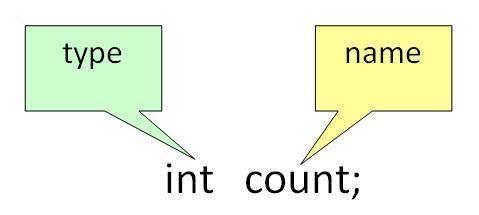
We can declare variables in java as pictorially depicted below as a visual aid.
From the image, it can be easily perceived that while declaring a variable we need to take care of two things that while de
Datatype: Type of data that can be stored in this variable. Dataname: Name given to the variable. In this way, a name can only be given to a memory location. It can be assigned values in two ways:
Variable Initialization
Assigning value by taking input
How to initialize variables?
It can be perceived with the help of 3 components that are as follows:
datatype: Type of data that can be stored in this variable.
variable_name: Name given to the variable.
value: It is the initial value stored in the variable.
Illustrations:
float simpleInterest;
// Declaring float variable
int time = 10, speed = 20;
// Declaring and Initializing integer variable
char var = 'h';
// Declaring and Initializing character variable
Now let us discuss different types of variables which are listed asfollows:
Local Variables
Instance Variables
Static Variables
Let us discuss traits of every variable been up here in detail
1. Local Variables
A variable defined within a block or method or constructor is called a local variable.
These variables are created when the block is entered or the function is called and destroyed after exiting from the block or when the call returns from the function.
The scope of these variables exists only within the block in which the variable is declared. i.e. we can access these variables only within that block.
Initialization of the local variable is mandatory before using it in the defined scope.
2. Instance Variables
Instance variables are non-static variables and are declared in a class outside any method, constructor,………………………………………………………….. or block.
As instance variables are declared in a class, these variables are created when an object of the class is created and destroyed when the object is destroyed.
Unlike local variables, we may use access specifiers for instance variables. If we do not specify any access specifier then the default access specifier will be used.
Initialization of Instance Variable is not Mandatory. Its default value is 0
Instance Variable can be accessed only by creating objects.
3. Static Variables
Static variables are also known as Class variables.
These variables are declared similarly as instance variables, the difference is that static variables are declared using the static keyword within a class outside any method constructor or block.
Unlike instance variables, we can only have one copy of a static variable per class irrespective of how many objects we create.
Static variables are created at the start of program execution and destroyed automatically when execution ends.
Initialization of Static Variable is not Mandatory. Its default value is 0
If we access the static variable like the Instance variable (through an object), the compiler will show the warning message and it won’t halt the program. The compiler will replace the object name with the class name automatically.
If we access the static variable without the class name, the compiler will automatically append the class name.
Now let us do discuss the differences between the Instance variable Vs the Static variables
Each object will have its own copy of the instance variable whereas We can only have one copy of a static variable per class irrespective of how many objects we create.
Changes made in an instance variable using one object will not be reflected in other objects as each object has its own copy of the instance variable. In the case of static, changes will be reflected in other objects as static variables are common to all objects of a class.
We can access instance variables through object references and Static Variables can be accessed directly using class name.
Syntax: Static and instance variables
class GFG
{
// Static variable
static int a;
// Instance variable
int b;
}



Comments
Post a Comment